

How to Use ChatGPT in Child Care, Daycare and Preschool Businesses
How to Use ChatGPT in Child Care, Daycare and Preschool Businesses
How to Use ChatGPT in Child Care, Daycare and Preschool Businesses

Last updated:
Implementing AI to improve your childcare business’s efficiency is probably a lot easier than you think. While there are a handful of AI programs designed specifically for childcare, daycare and preschool purposes, a ChatGPT account can help you get a sense for how AI tools can streamline business operations in a lot of ways.
ChatGPT is a large language model (LLM) offered by the company OpenAI. Large language models are AI tools that effectively take the form of intelligent chatbots that have access to a ton of preloaded information, internet access (generally), and whatever tools or information you give to it. ChatGPT is not the only LLM out there, but it is the most widely known and the most-used LLM among child care providers.
Below we’ll review some of the basics and best practices for child care providers interested in seeing what ChatGPT can do for their operations. Much of this knowledge is also transferable to other AI tools.
What tasks can child care providers use ChatGPT for?
ChatGPT can help you with a wide range of tasks and nuanced situations that may come up in your day-to-day business, but some common solutions it can help childcare providers with include:
Drafting parent communications
Drafting marketing materials, like newsletters and social media posts
Behavioral management plans
Creating staff training materials or policy drafts
Lesson plans and ideas
Generating images (for marketing or activites)
Meal planning
Organizing, summarizing, or reporting on data
Foreign language translation
Research
Other purpose-built AI solutions can go above and beyond the capabilities of a basic ChatGPT subscription, such as answering phone calls 24/7, predictive analytics, and integrating directly with your sales, marketing, and communication platform for less context-switching, better cohesion, and additional time savings. Book a free demo with Playground to learn more about custom-built AI solutions for your childcare business.
Cost of ChatGPT
ChatGPT offers a variety of plans depending on your needs. These range from a free plan to hundreds of dollars per month. To test the waters, a free plan or a Plus plan ($20 per month) will suffice for most child care directors. If you like the results, you may want to expand your plan to include more of your staff members.
How Child Care Providers Can Start Using ChatGPT
While you don’t even need an account to use ChatGPT, it’s best to sign up in order to save the context of your conversations and ensure better privacy settings. Regardless of your account type, you can sign up at ChatGPT.com.
The interface looks like a search bar, and you can start talking to ChatGPT like it’s a person, requesting information, brainstorming, and giving it feedback. Practice going back and forth with it to get an understanding of its capabilities.
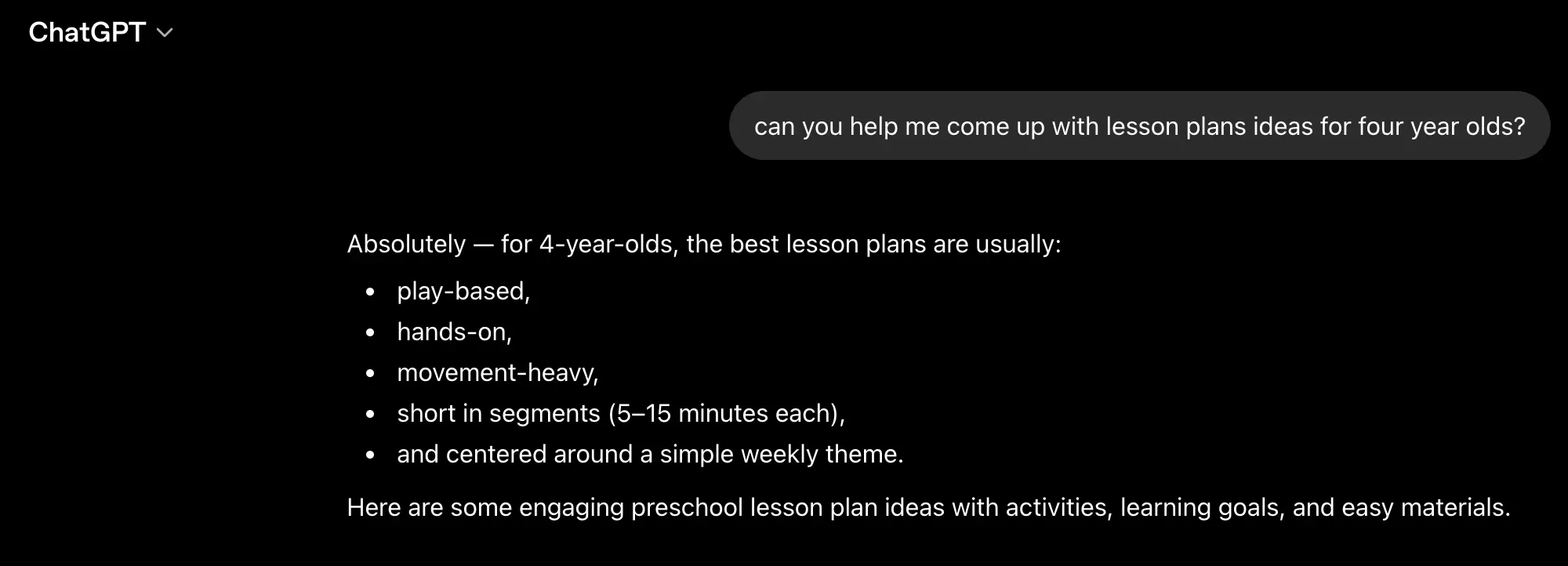
You’ll notice a paperclip attachment near the text interface allows you to upload files, such as images, forms, screenshots, or data files. You can also copy and paste information directly to it. You can ask ChatGPT to complete tasks based on information you give it, but make sure to avoid sharing personally identifiable information or other sensitive material, especially if you’re on a free plan. Team- and enterprise-level accounts have better security and privacy settings for such purposes.
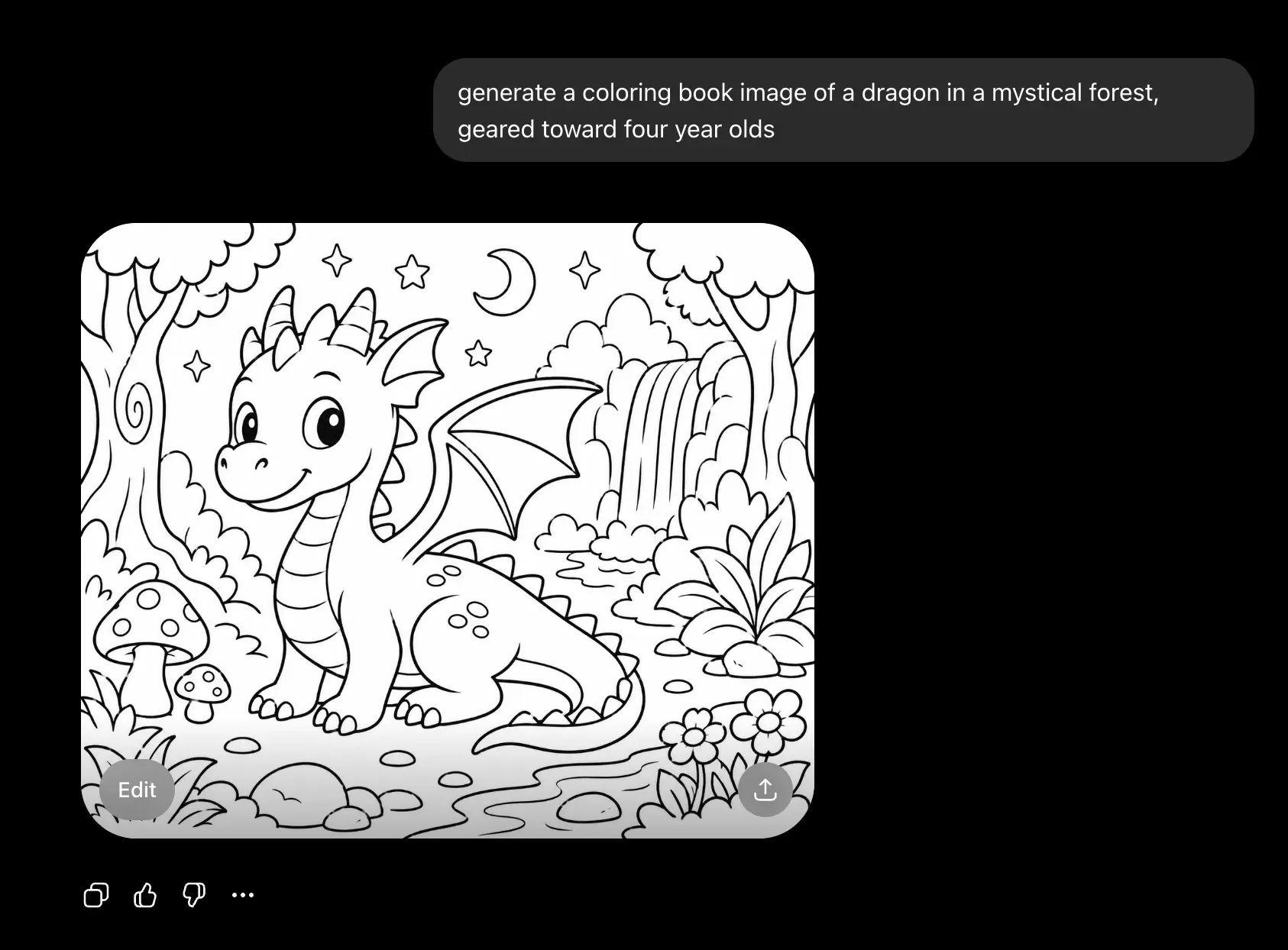
In addition to text queries and uploading materials to perform tasks with, you can ask ChatGPT to generate images for you, and then edit them to your liking right in the interface. For childcare providers, this feature may be useful for marketing materials or lesson plans and activities.
Best Practices for Child Care Providers Using ChatGPT
Keep in mind that ChatGPT does not know you or your circumstances and goals when you first start, so you will need to provide ample context about your business and the task at hand. The tool is designed to handle questions and tasks from a massive variety of users, so it might take some time for you to get used to each other, so to speak. In general, you’ll want to provide as much context as you can to get the most useful outputs.
You’ll notice on the left sidebar you have options to reference past chats, search your previous conversations, and explore other features. Past chat and project functionality can be especially helpful when you’re working on separate projects in ChatGPT where you’d want to save the context for next time – for instance, you might want to keep one project or chat aside for marketing emails, and another for lesson plan ideas to make sure you maintain continuity with each.
In this sense, it may make sense to prepare a brand guide or instructional guide for ChatGPT use (more below), especially if you have a wider team that will be using it as well. This will help ensure consistency in application, tone, and overall performance.
It’s also important to be willing to go back and forth with ChatGPT if it is not cooperating as expected or gets something wrong. You can speak to it like a person, giving it honest feedback or challenging it if you think it is not performing as it should.
Human in the loop
While AI models are constantly being improved, you still have to always assume you are at risk of being given incorrect information, commonly referred to as hallucinations. That’s why it’s essential to have a “human in the loop” for tasks you use ChatGPT for. Particularly for public-facing material or anything of a sensitive nature, make sure a trusted individual reviews the content generated and edits appropriately. It’s best to treat your ChatGPT queries and requests as a conversation with an employee, providing feedback and guidance for the tool at each step.
Developing a brand guide or instructional document
Having a document that you can hand over to ChatGPT – or any LLM – will prove to be an effective way of retrieving outputs consistent with your brand and intent, especially if you’re working with a wider team where different users might be using ChatGPT at different times for different tasks. You’ll want to include general rules and brand guidelines, and anything else you want it to know. As you play around more with ChatGPT, you’ll get a better feel for what type of context it needs to adequately match your standards.
Some items to consider including in your instruction guide might include:
Brand name, logo, mission, colors and fonts
Instructions on reporting styles
Formatting standards or intent for emails, blog posts, other material
Base statistics or information that are important to the tasks it will complete
What type of instructions or requests from staff to refuse or reorient from
Data privacy and confidentiality rules
Using examples or otherwise building out logic flows for different tasks may also be helpful for an advanced operation where scale is important.
Risks and Limitations
As with anything, there are some risks to using AI, but as long as you are aware and mindful, you’ll be able to mitigate most this. The two main risks you should be mindful of are hallucinations, or incorrect information, and data and privacy security. Making sure a trusted individual reviews all final outputs and otherwise handles sensitive data (like personally identifying information, or PII) appropriately are the most important ways to mitigate risk when using AI.
Other Options for Child Care Providers Considering ChatGPT
Different models
You may notice within the ChatGPT interface that you have the option to switch between different models. New models get released over time with better and different capabilities, so it may be worthwhile to test different models for your use cases, and try new ones as they come out. For example, at the time of publishing, the following models are available from ChatGPT:
As of May 2026, the main models available in ChatGPT typically include:
GPT-5.5 Instant (or GPT-5.5). The current default model for most everyday tasks. Fast, accurate, and great for general use like drafting parent emails, creating activity plans, or summarizing meeting notes.
GPT-5.5 Thinking. Best for more complex reasoning, such as creating staff schedules, analyzing enrollment trends, or developing detailed policies.
GPT-5.5 Pro. The most powerful option (usually available on higher-tier plans like Pro or Team). Ideal for in-depth work like financial projections, compliance documents, or strategic planning.
GPT-5.4 family (including GPT-5.4 Pro, GPT-5.4 Thinking, and GPT-5.4 mini). Still widely available and often excellent value. The “mini” versions are faster and cheaper for simpler, high-volume tasks.
Legacy/older models may appear in a “Legacy” section for a limited time after newer ones launch.
For most child care center needs, you can start with the default Instant model for most daily work. Switch to Thinking or Pro when you need deeper analysis or more creative solutions.
ChatGPT Competitors for Child Care Businesses
In addition to trying different models within ChatGPT, it may also be worthwhile to sample other competitive LLMs. Different models will offer different capabilities, personalities, and characteristics that may lead to better or worse performance given your specific use cases and taste. Some competitors that may be worth testing include Claude, Gemini, and Grok. These LLMs also will release new models over time.
Purpose-Built AI for Child Care
ChatGPT is a general solution, and so more context and legwork might be needed to get it to execute tasks for childcare businesses effectively. But some vendors create AI tools specifically for the use cases you would find most helpful, such as enrollment projections, fielding phone calls, scheduling tours, and answering questions for your staff. For instance, Playground offers AI features like Camber, an AI employee that can seamlessly field phone calls 24/7 to help you make the most of prospective customers. It also offers Predictive Enrollment to help you minimize the time you spend with unfilled enrollment slots, and get your waitlist cleared – and refilled – at a faster rate. Consider booking a free demo to see these features in action, along with other AI features from Playground.
Implementing AI to improve your childcare business’s efficiency is probably a lot easier than you think. While there are a handful of AI programs designed specifically for childcare, daycare and preschool purposes, a ChatGPT account can help you get a sense for how AI tools can streamline business operations in a lot of ways.
ChatGPT is a large language model (LLM) offered by the company OpenAI. Large language models are AI tools that effectively take the form of intelligent chatbots that have access to a ton of preloaded information, internet access (generally), and whatever tools or information you give to it. ChatGPT is not the only LLM out there, but it is the most widely known and the most-used LLM among child care providers.
Below we’ll review some of the basics and best practices for child care providers interested in seeing what ChatGPT can do for their operations. Much of this knowledge is also transferable to other AI tools.
What tasks can child care providers use ChatGPT for?
ChatGPT can help you with a wide range of tasks and nuanced situations that may come up in your day-to-day business, but some common solutions it can help childcare providers with include:
Drafting parent communications
Drafting marketing materials, like newsletters and social media posts
Behavioral management plans
Creating staff training materials or policy drafts
Lesson plans and ideas
Generating images (for marketing or activites)
Meal planning
Organizing, summarizing, or reporting on data
Foreign language translation
Research
Other purpose-built AI solutions can go above and beyond the capabilities of a basic ChatGPT subscription, such as answering phone calls 24/7, predictive analytics, and integrating directly with your sales, marketing, and communication platform for less context-switching, better cohesion, and additional time savings. Book a free demo with Playground to learn more about custom-built AI solutions for your childcare business.
Cost of ChatGPT
ChatGPT offers a variety of plans depending on your needs. These range from a free plan to hundreds of dollars per month. To test the waters, a free plan or a Plus plan ($20 per month) will suffice for most child care directors. If you like the results, you may want to expand your plan to include more of your staff members.
How Child Care Providers Can Start Using ChatGPT
While you don’t even need an account to use ChatGPT, it’s best to sign up in order to save the context of your conversations and ensure better privacy settings. Regardless of your account type, you can sign up at ChatGPT.com.
The interface looks like a search bar, and you can start talking to ChatGPT like it’s a person, requesting information, brainstorming, and giving it feedback. Practice going back and forth with it to get an understanding of its capabilities.
You’ll notice a paperclip attachment near the text interface allows you to upload files, such as images, forms, screenshots, or data files. You can also copy and paste information directly to it. You can ask ChatGPT to complete tasks based on information you give it, but make sure to avoid sharing personally identifiable information or other sensitive material, especially if you’re on a free plan. Team- and enterprise-level accounts have better security and privacy settings for such purposes.
In addition to text queries and uploading materials to perform tasks with, you can ask ChatGPT to generate images for you, and then edit them to your liking right in the interface. For childcare providers, this feature may be useful for marketing materials or lesson plans and activities.
Best Practices for Child Care Providers Using ChatGPT
Keep in mind that ChatGPT does not know you or your circumstances and goals when you first start, so you will need to provide ample context about your business and the task at hand. The tool is designed to handle questions and tasks from a massive variety of users, so it might take some time for you to get used to each other, so to speak. In general, you’ll want to provide as much context as you can to get the most useful outputs.
You’ll notice on the left sidebar you have options to reference past chats, search your previous conversations, and explore other features. Past chat and project functionality can be especially helpful when you’re working on separate projects in ChatGPT where you’d want to save the context for next time – for instance, you might want to keep one project or chat aside for marketing emails, and another for lesson plan ideas to make sure you maintain continuity with each.
In this sense, it may make sense to prepare a brand guide or instructional guide for ChatGPT use (more below), especially if you have a wider team that will be using it as well. This will help ensure consistency in application, tone, and overall performance.
It’s also important to be willing to go back and forth with ChatGPT if it is not cooperating as expected or gets something wrong. You can speak to it like a person, giving it honest feedback or challenging it if you think it is not performing as it should.
Human in the loop
While AI models are constantly being improved, you still have to always assume you are at risk of being given incorrect information, commonly referred to as hallucinations. That’s why it’s essential to have a “human in the loop” for tasks you use ChatGPT for. Particularly for public-facing material or anything of a sensitive nature, make sure a trusted individual reviews the content generated and edits appropriately. It’s best to treat your ChatGPT queries and requests as a conversation with an employee, providing feedback and guidance for the tool at each step.
Developing a brand guide or instructional document
Having a document that you can hand over to ChatGPT – or any LLM – will prove to be an effective way of retrieving outputs consistent with your brand and intent, especially if you’re working with a wider team where different users might be using ChatGPT at different times for different tasks. You’ll want to include general rules and brand guidelines, and anything else you want it to know. As you play around more with ChatGPT, you’ll get a better feel for what type of context it needs to adequately match your standards.
Some items to consider including in your instruction guide might include:
Brand name, logo, mission, colors and fonts
Instructions on reporting styles
Formatting standards or intent for emails, blog posts, other material
Base statistics or information that are important to the tasks it will complete
What type of instructions or requests from staff to refuse or reorient from
Data privacy and confidentiality rules
Using examples or otherwise building out logic flows for different tasks may also be helpful for an advanced operation where scale is important.
Risks and Limitations
As with anything, there are some risks to using AI, but as long as you are aware and mindful, you’ll be able to mitigate most this. The two main risks you should be mindful of are hallucinations, or incorrect information, and data and privacy security. Making sure a trusted individual reviews all final outputs and otherwise handles sensitive data (like personally identifying information, or PII) appropriately are the most important ways to mitigate risk when using AI.
Other Options for Child Care Providers Considering ChatGPT
Different models
You may notice within the ChatGPT interface that you have the option to switch between different models. New models get released over time with better and different capabilities, so it may be worthwhile to test different models for your use cases, and try new ones as they come out. For example, at the time of publishing, the following models are available from ChatGPT:
As of May 2026, the main models available in ChatGPT typically include:
GPT-5.5 Instant (or GPT-5.5). The current default model for most everyday tasks. Fast, accurate, and great for general use like drafting parent emails, creating activity plans, or summarizing meeting notes.
GPT-5.5 Thinking. Best for more complex reasoning, such as creating staff schedules, analyzing enrollment trends, or developing detailed policies.
GPT-5.5 Pro. The most powerful option (usually available on higher-tier plans like Pro or Team). Ideal for in-depth work like financial projections, compliance documents, or strategic planning.
GPT-5.4 family (including GPT-5.4 Pro, GPT-5.4 Thinking, and GPT-5.4 mini). Still widely available and often excellent value. The “mini” versions are faster and cheaper for simpler, high-volume tasks.
Legacy/older models may appear in a “Legacy” section for a limited time after newer ones launch.
For most child care center needs, you can start with the default Instant model for most daily work. Switch to Thinking or Pro when you need deeper analysis or more creative solutions.
ChatGPT Competitors for Child Care Businesses
In addition to trying different models within ChatGPT, it may also be worthwhile to sample other competitive LLMs. Different models will offer different capabilities, personalities, and characteristics that may lead to better or worse performance given your specific use cases and taste. Some competitors that may be worth testing include Claude, Gemini, and Grok. These LLMs also will release new models over time.
Purpose-Built AI for Child Care
ChatGPT is a general solution, and so more context and legwork might be needed to get it to execute tasks for childcare businesses effectively. But some vendors create AI tools specifically for the use cases you would find most helpful, such as enrollment projections, fielding phone calls, scheduling tours, and answering questions for your staff. For instance, Playground offers AI features like Camber, an AI employee that can seamlessly field phone calls 24/7 to help you make the most of prospective customers. It also offers Predictive Enrollment to help you minimize the time you spend with unfilled enrollment slots, and get your waitlist cleared – and refilled – at a faster rate. Consider booking a free demo to see these features in action, along with other AI features from Playground.
Jaclyn is a data journalist and CFP™ who evaluates trends in the childcare industry and wider economy. She has previously worked for publications including CNET, SmartAsset, Bizfluent, AZCentral and Chron, and as a research consultant for NAPCO Media. Her insights are often cited by publications including Bloomberg, CNBC, Business Insider, Fox News, USA Today, The Hill and more. She has a bachelor’s degree in economics and mathematics from The College of New Jersey.
Share this article
The highest rated child care software
Ratings and review counts from public app store listings, May 2026.




Book a demo and simplify every corner of your business.




Book a demo and simplify every corner of your business.
