

Show up First in Childcare Search Results
Show up First in Childcare Search Results
Show up First in Childcare Search Results

Last updated:
When families begin searching for child care, they rarely start with a phone call. They start with Google.
They search for “preschool near me,” scroll through local options, glance at star ratings, and read a few reviews before ever reaching out. In many cases, the programs that show up first — and feel most trustworthy online — are the ones that get the tour requests.
That’s why your online presence isn’t just marketing. It’s part of your enrollment system.
A strong digital footprint helps families find you, but more importantly, it builds confidence long before they take the next step.
The 3 big wins that help childcare programs get picked online
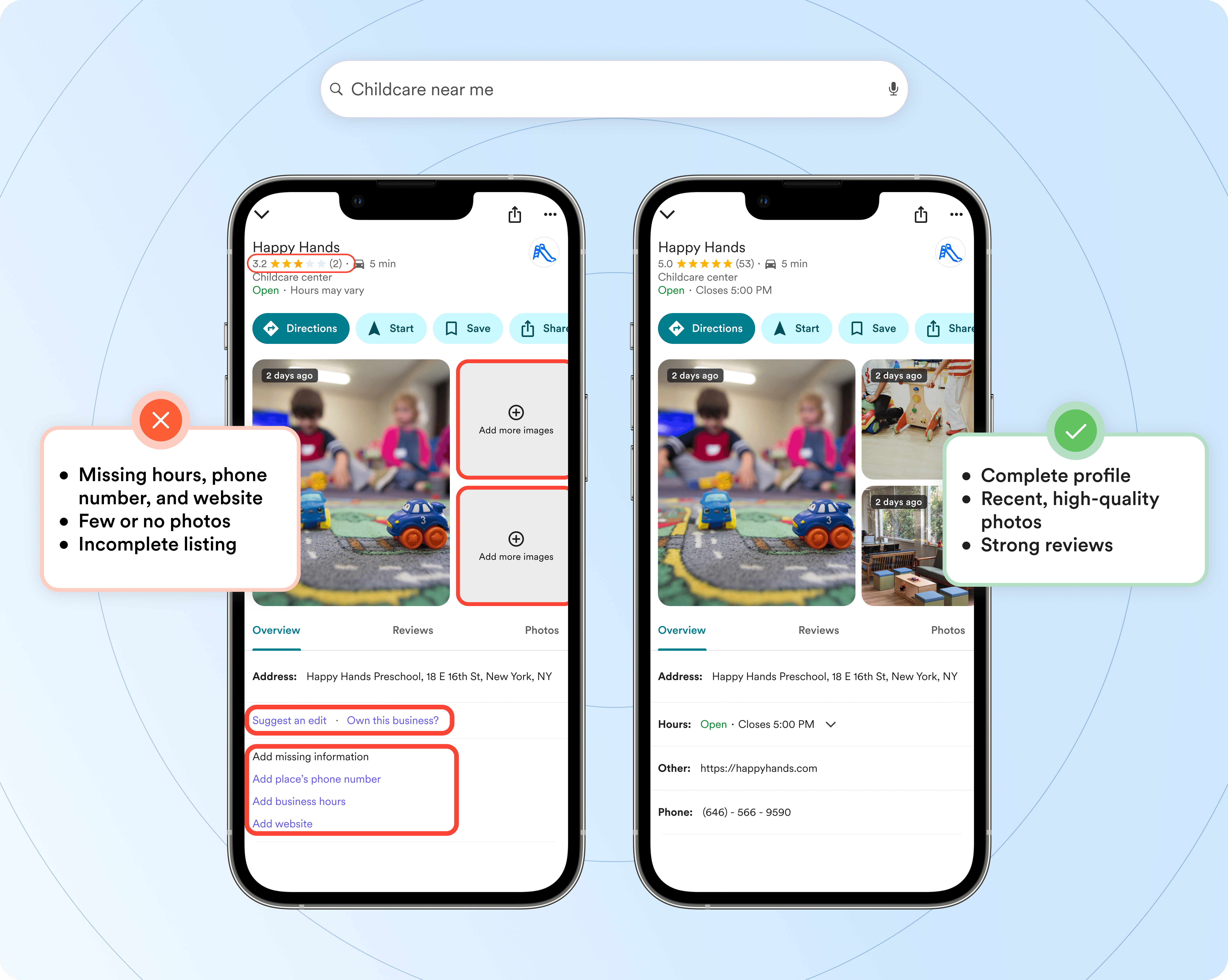
Big Win #1: Make your Google Business Profile feel “complete”
One of the most powerful (and free) tools available to child care programs is a Google Business Profile. This is the profile that appears when families search for programs on Google Search or Google Maps — often before they ever reach your website.
Google’s own guidance is clear: your business categories and profile completeness affect where you appear in local search results.
What to focus on:
Claim your profile if you haven’t already
Ensure every section is filled out accurately (hours, address, contact info)
Add photos regularly (your space, classrooms, outdoor area, team)
Link your website so families can easily take the next step
Choose the most accurate primary category (then add a few relevant secondary categories)
A quick note on categories: Google recommends choosing a primary category that best describes your business, because categories influence which searches you appear for.
(Practical tip: look at a few top programs in your area on Google Maps and see which categories they use as a starting point.)
Big Win #2: Get consistent Google reviews (recency matters)
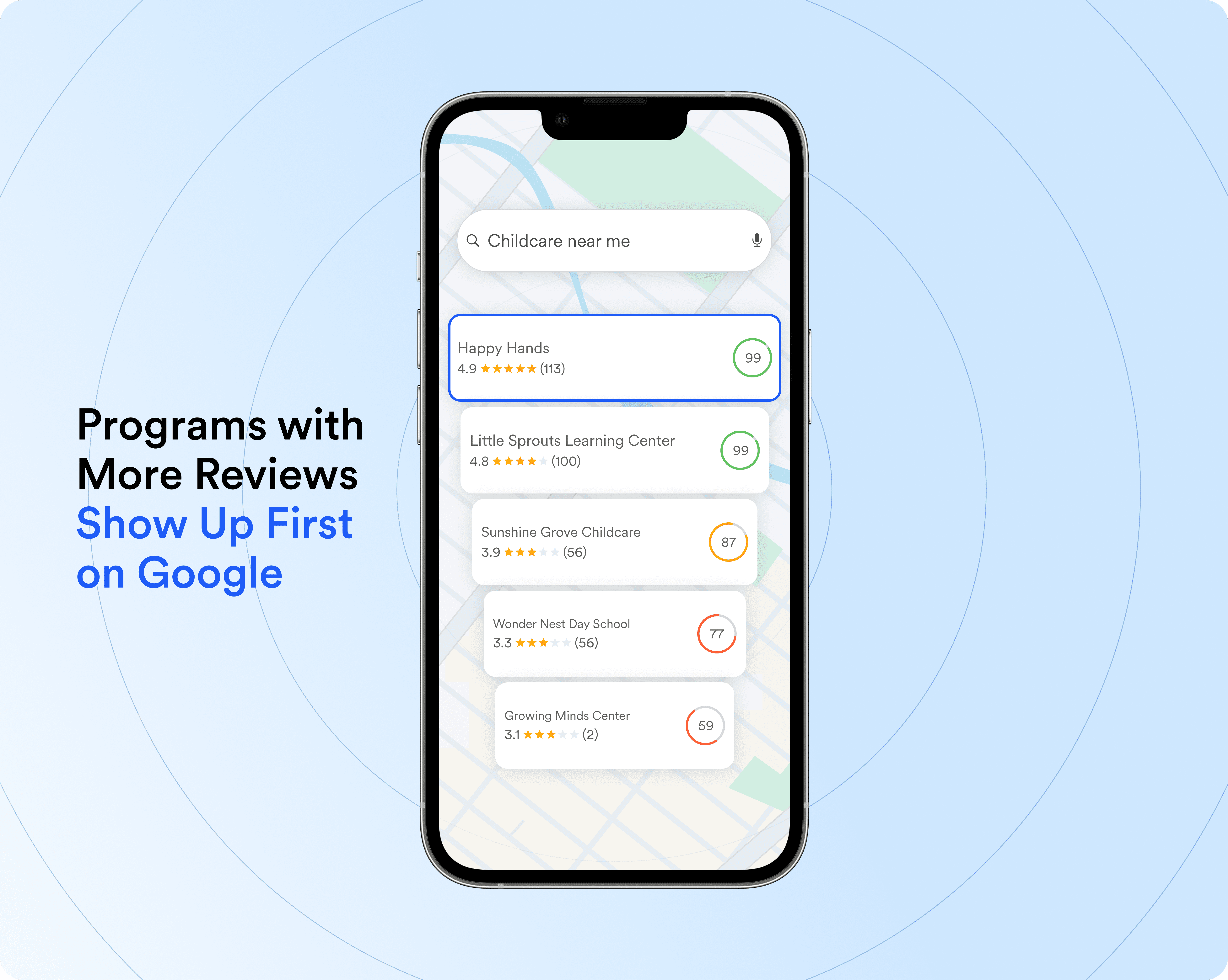
Google explicitly notes that more reviews and positive ratings can help your local ranking. And across local SEO guidance, it’s not just having reviews — it’s getting them consistently.
Reviews also function as social proof. Even if a family loves your website, many still want to hear from other parents before they commit.
A strong mix of recent reviews can help your program:
Appear more often in searches like “child care near me”
Build trust before a family ever reaches out
Drive more clicks, calls, and tour bookings
Stand out from competitors with fewer or older reviews
Big Win #3: Respond to every review to build trust and show engagement
Reviews don’t just influence whether families trust you — they influence whether families choose you.
Responses matter. Google Business Profile guidance highlights the value of responding thoughtfully to reviews as a trust-building practice.
A thoughtful response shows prospective parents that you care about communication, community, and feedback.
What strong review responses look like:
Thank positive reviewers and reinforce what they appreciated
Respond calmly and professionally to negative reviews
Avoid arguments or long explanations
Offer to follow up privately to address concerns
Use language that reflects what families are searching for
For example: “We’re so glad you’ve felt supported by our teachers and daily communication. Thank you for being part of our community.”
A common mistake that quietly hurts enrollment
Most programs don’t lose families because they aren’t great — they lose them because the online path to action is unclear.
If a parent clicks your listing but can’t quickly confirm the basics (hours, location, what makes you different, and how to schedule a tour), they may bounce and move to the next option.
So as you improve your profile and reviews, make sure your website link leads somewhere that makes the next step obvious.
Not sure how your program shows up in search today? Take our free Enrollment Readiness Assessment for personalized next steps.
Make review collection a repeatable process
The most successful programs don’t treat reviews as a one-time task. They build review requests into their routine.
A simple system might include:
Sending a review link after a successful tour
Including a request after the first month of enrollment
Adding a review reminder in a newsletter or parent update
Using QR codes at events or family nights
Encouraging families to mention specific details (communication, teachers, environment)
Conclusion: Make your online presence work for you
For child care programs, visibility and trust are everything.
A well-optimized Google Business Profile paired with a consistent review strategy will help you:
Get found by families searching locally
Convert online interest into tours and enrollment
Build long-term credibility through authentic parent feedback
When families begin searching for child care, they rarely start with a phone call. They start with Google.
They search for “preschool near me,” scroll through local options, glance at star ratings, and read a few reviews before ever reaching out. In many cases, the programs that show up first — and feel most trustworthy online — are the ones that get the tour requests.
That’s why your online presence isn’t just marketing. It’s part of your enrollment system.
A strong digital footprint helps families find you, but more importantly, it builds confidence long before they take the next step.
The 3 big wins that help childcare programs get picked online
Big Win #1: Make your Google Business Profile feel “complete”
One of the most powerful (and free) tools available to child care programs is a Google Business Profile. This is the profile that appears when families search for programs on Google Search or Google Maps — often before they ever reach your website.
Google’s own guidance is clear: your business categories and profile completeness affect where you appear in local search results.
What to focus on:
Claim your profile if you haven’t already
Ensure every section is filled out accurately (hours, address, contact info)
Add photos regularly (your space, classrooms, outdoor area, team)
Link your website so families can easily take the next step
Choose the most accurate primary category (then add a few relevant secondary categories)
A quick note on categories: Google recommends choosing a primary category that best describes your business, because categories influence which searches you appear for.
(Practical tip: look at a few top programs in your area on Google Maps and see which categories they use as a starting point.)
Big Win #2: Get consistent Google reviews (recency matters)
Google explicitly notes that more reviews and positive ratings can help your local ranking. And across local SEO guidance, it’s not just having reviews — it’s getting them consistently.
Reviews also function as social proof. Even if a family loves your website, many still want to hear from other parents before they commit.
A strong mix of recent reviews can help your program:
Appear more often in searches like “child care near me”
Build trust before a family ever reaches out
Drive more clicks, calls, and tour bookings
Stand out from competitors with fewer or older reviews
Big Win #3: Respond to every review to build trust and show engagement
Reviews don’t just influence whether families trust you — they influence whether families choose you.
Responses matter. Google Business Profile guidance highlights the value of responding thoughtfully to reviews as a trust-building practice.
A thoughtful response shows prospective parents that you care about communication, community, and feedback.
What strong review responses look like:
Thank positive reviewers and reinforce what they appreciated
Respond calmly and professionally to negative reviews
Avoid arguments or long explanations
Offer to follow up privately to address concerns
Use language that reflects what families are searching for
For example: “We’re so glad you’ve felt supported by our teachers and daily communication. Thank you for being part of our community.”
A common mistake that quietly hurts enrollment
Most programs don’t lose families because they aren’t great — they lose them because the online path to action is unclear.
If a parent clicks your listing but can’t quickly confirm the basics (hours, location, what makes you different, and how to schedule a tour), they may bounce and move to the next option.
So as you improve your profile and reviews, make sure your website link leads somewhere that makes the next step obvious.
Not sure how your program shows up in search today? Take our free Enrollment Readiness Assessment for personalized next steps.
Make review collection a repeatable process
The most successful programs don’t treat reviews as a one-time task. They build review requests into their routine.
A simple system might include:
Sending a review link after a successful tour
Including a request after the first month of enrollment
Adding a review reminder in a newsletter or parent update
Using QR codes at events or family nights
Encouraging families to mention specific details (communication, teachers, environment)
Conclusion: Make your online presence work for you
For child care programs, visibility and trust are everything.
A well-optimized Google Business Profile paired with a consistent review strategy will help you:
Get found by families searching locally
Convert online interest into tours and enrollment
Build long-term credibility through authentic parent feedback
Sasha Reiss is the CPO & Co-Founder of Playground, the child care management platform used by 500K+ providers, teachers, and families across all 50 states. He's a co-author of More Than Tuition, Financial Leadership, and also Producer of Early Childhood Investigations, a free professional development platform for early education. Sasha's work focuses on building systems that reduce administrative burden and make excellent child care accessible to all.
Share this article


Book a demo and simplify every corner of your business.




Book a demo and simplify every corner of your business.
