

Table of Contents
Changelog
Enterprise Dispute Center & Unified Schedules on Mobile
Enterprise Dispute Center & Unified Schedules on Mobile
Published
Mobile Version
594
In This Update
2 Releases
13 Improvements
1 Fixes
Mobile Version
594
2 Releases
13 Improvements
1 Fixes
Billing & Finances
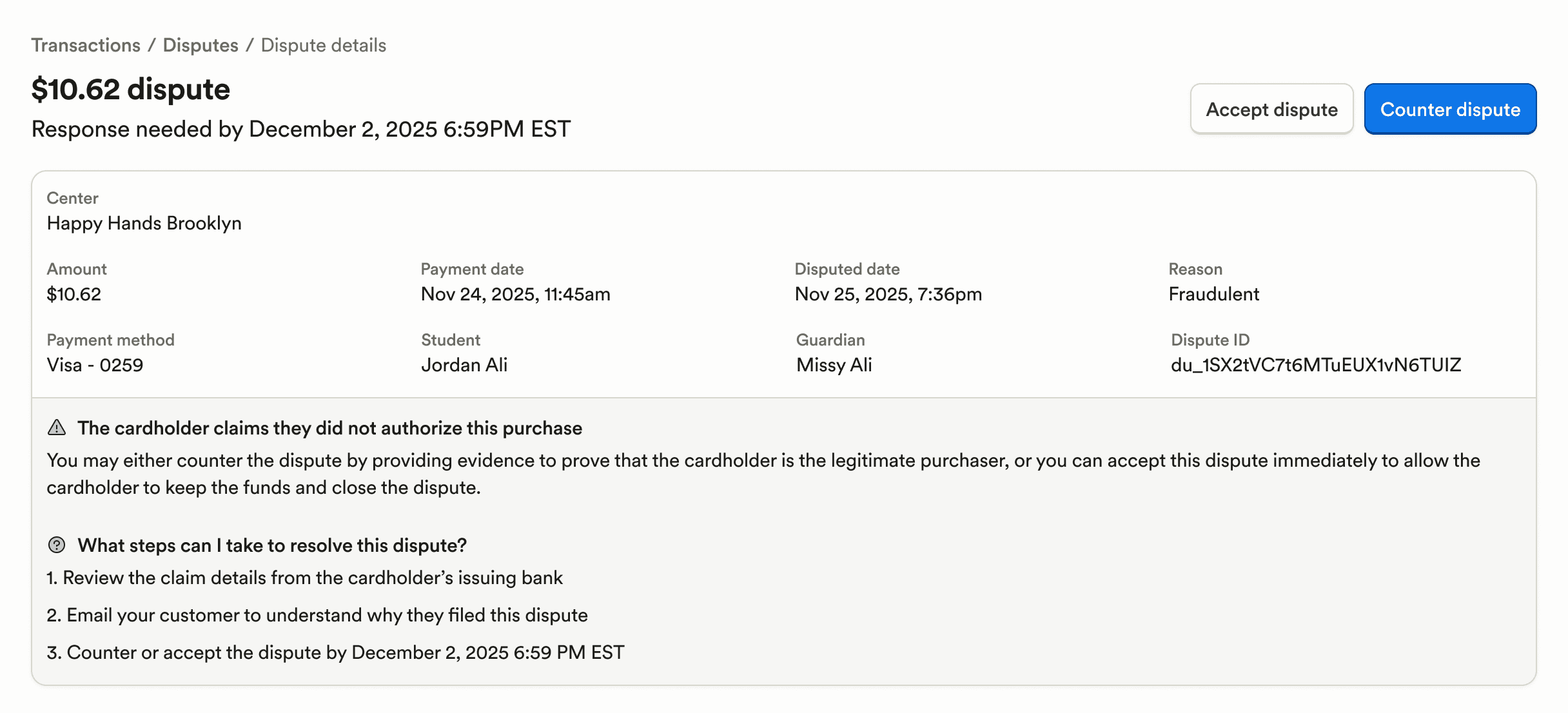
Enterprise users now have an enterprise-wide disputes list, detail, and submission flow, making it easy to view and resolve disputes across all locations without switching between locations. Save up to 75% of your time previously spent on managing disputes.
A “Discount accounting code(s)” column can now be added to the billing Transactions page, improving financial tracking and exports.
Custom expense categories are now integrated into the spend overview when viewing a spend card, giving clearer visibility into where money is going.
Payroll & HR
Staff profiles now include a Benefits tab within Payroll, giving clearer visibility into employee benefits.
Semi-monthly pay schedules now support weekend dates, improving payroll flexibility.
After ending a subsidy voucher, the system now guides users directly into the add-voucher flow with key details prefilled, reducing setup time and errors when creating a new voucher for the same child.
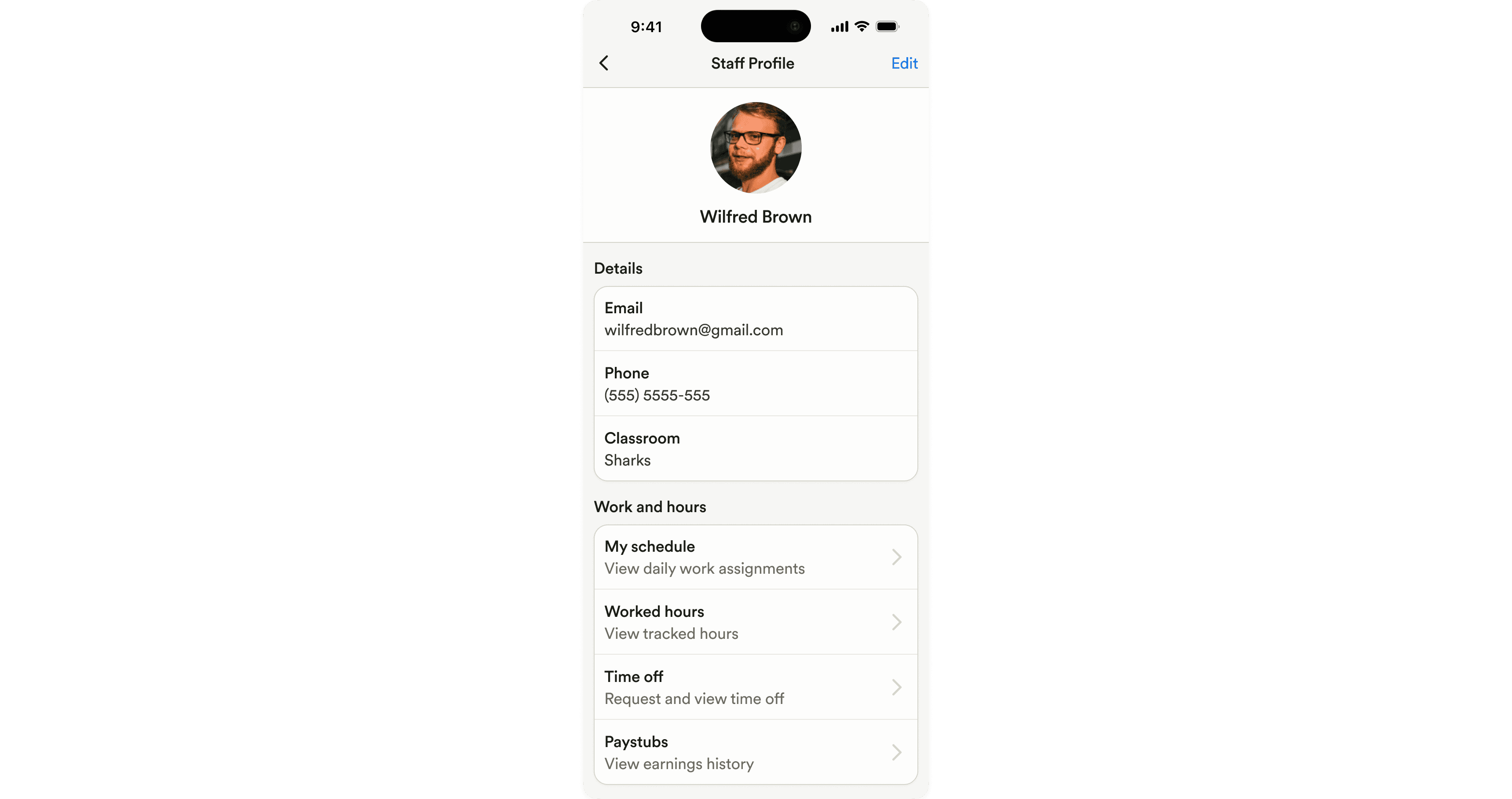
On mobile, staff who use payroll can now view their paystubs directly from their profile.
Payroll language has been updated from Guideline to Accrue to reflect the provider’s name change.
Enrollment & Paperwork
The program's name is now automatically included in paperwork rejection emails to guardians, reducing confusion when families manage paperwork for multiple programs.
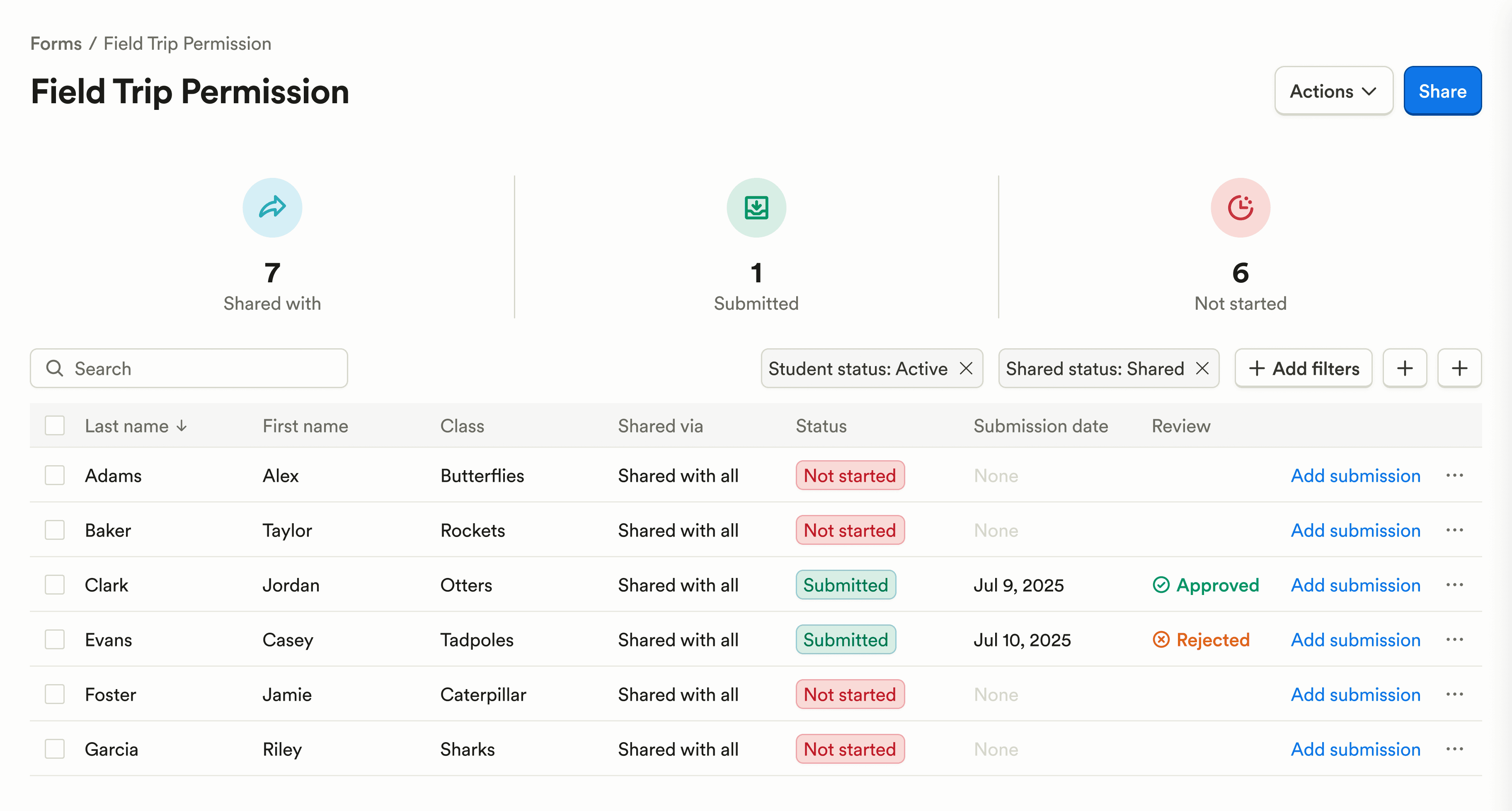
A new “Rejected” paperwork submission status has been added, making it clearer which forms need attention.
Fixed an issue where paperwork reminders could not be opened on mobile.
Attendance & Ratios
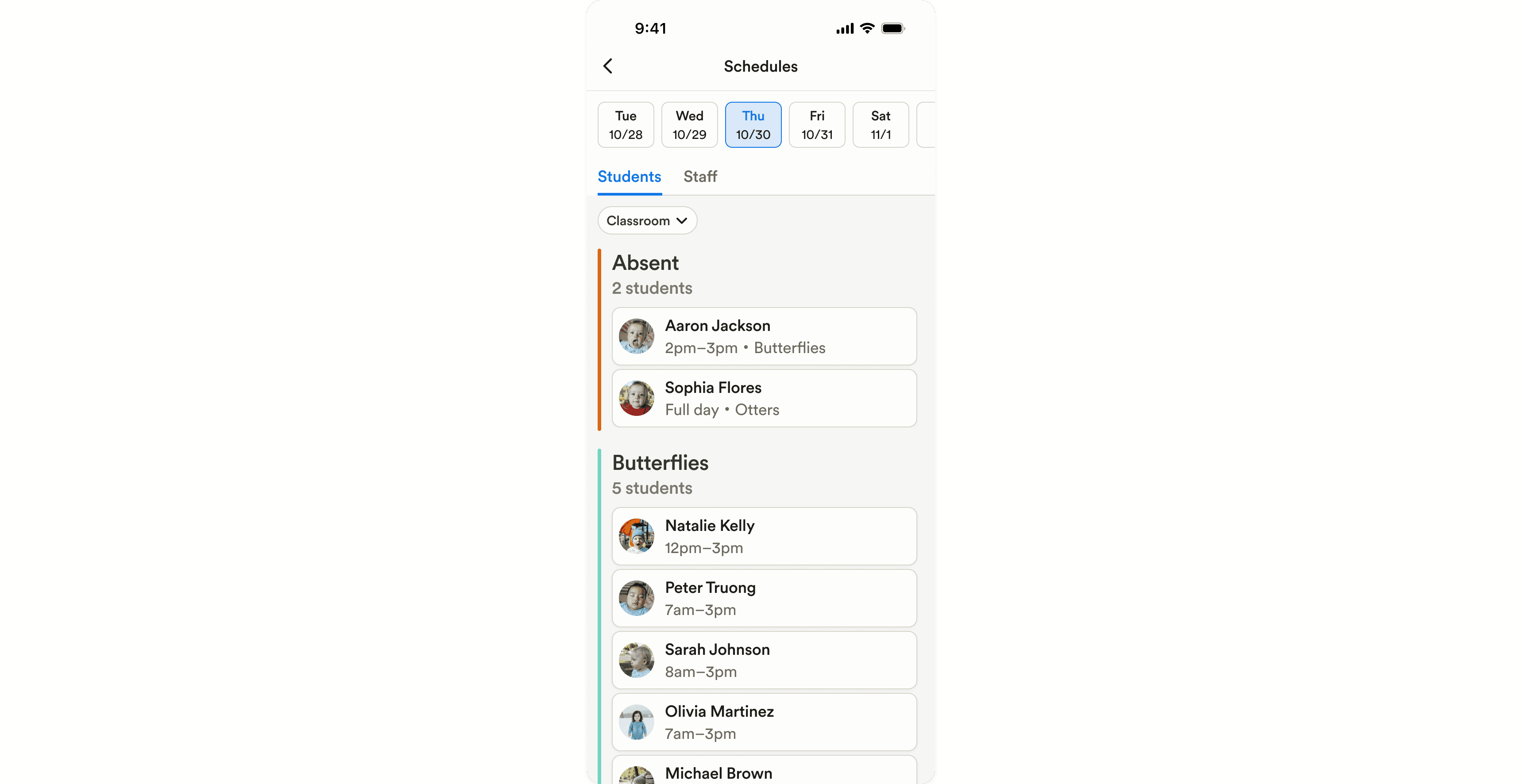
A unified Schedules screen has been added on mobile for students and staff, allowing teachers to view schedules by day and filter by classroom or scheduled status to quickly see when and where students are expected.
Reporting & Insights
On the Forecast Enrollment page, the student sidebar now includes a Billing Plans section showing installment plans for better context during forecasting and scheduling transitions.
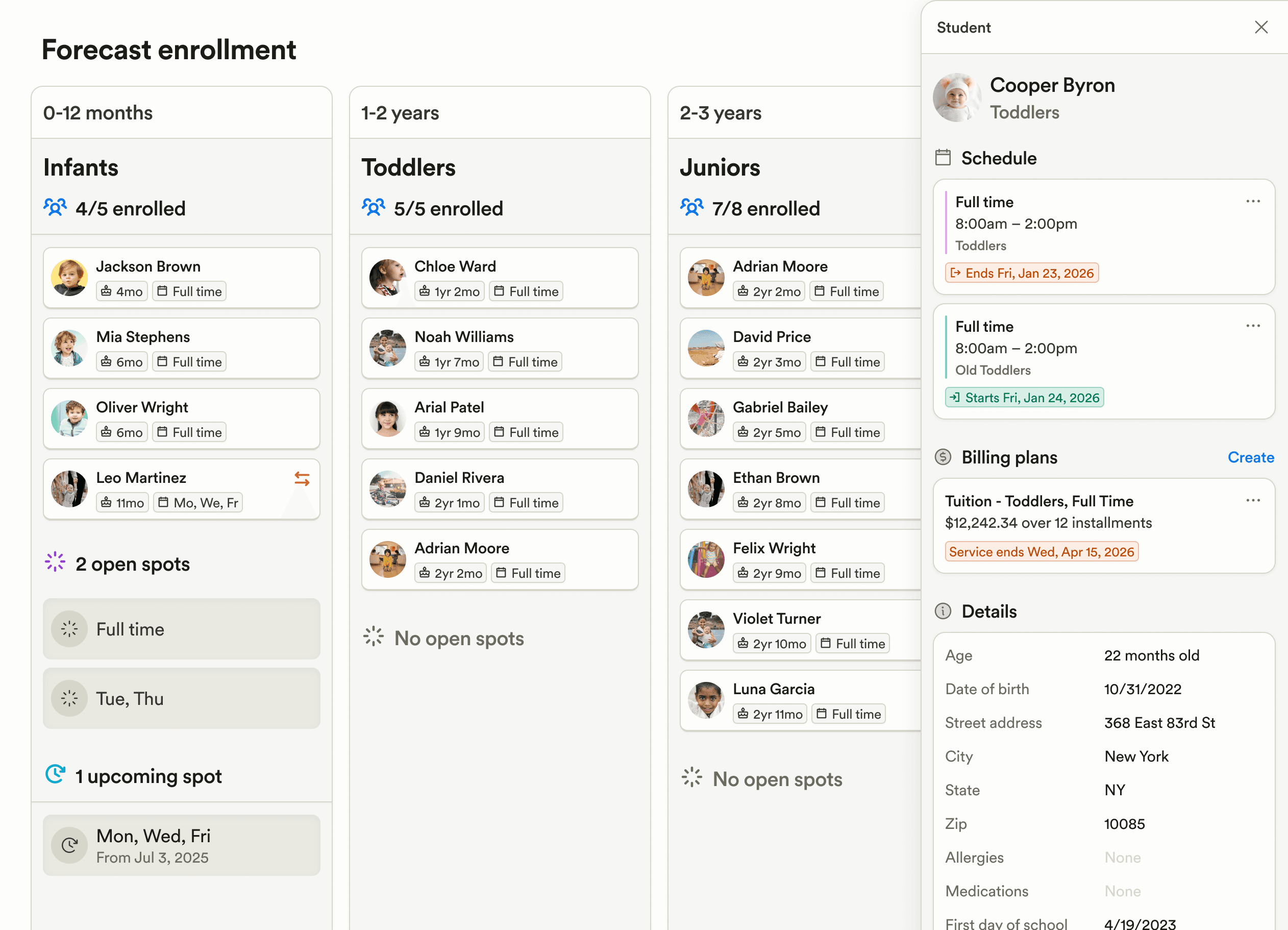
Forecast enrollment now filters upcoming spots to only include valid ranges, improving accuracy.
Platform, Integrations & Admin
On mobile, a new full-screen center switcher with search makes it faster to navigate between centers for enterprise users.
The mobile settings page has been updated to align visually with the rest of the app.
Billing & Finances
Enterprise users now have an enterprise-wide disputes list, detail, and submission flow, making it easy to view and resolve disputes across all locations without switching between locations. Save up to 75% of your time previously spent on managing disputes.
A “Discount accounting code(s)” column can now be added to the billing Transactions page, improving financial tracking and exports.
Custom expense categories are now integrated into the spend overview when viewing a spend card, giving clearer visibility into where money is going.
Payroll & HR
Staff profiles now include a Benefits tab within Payroll, giving clearer visibility into employee benefits.
Semi-monthly pay schedules now support weekend dates, improving payroll flexibility.
After ending a subsidy voucher, the system now guides users directly into the add-voucher flow with key details prefilled, reducing setup time and errors when creating a new voucher for the same child.
On mobile, staff who use payroll can now view their paystubs directly from their profile.
Payroll language has been updated from Guideline to Accrue to reflect the provider’s name change.
Enrollment & Paperwork
The program's name is now automatically included in paperwork rejection emails to guardians, reducing confusion when families manage paperwork for multiple programs.
A new “Rejected” paperwork submission status has been added, making it clearer which forms need attention.
Fixed an issue where paperwork reminders could not be opened on mobile.
Attendance & Ratios
A unified Schedules screen has been added on mobile for students and staff, allowing teachers to view schedules by day and filter by classroom or scheduled status to quickly see when and where students are expected.
Reporting & Insights
On the Forecast Enrollment page, the student sidebar now includes a Billing Plans section showing installment plans for better context during forecasting and scheduling transitions.
Forecast enrollment now filters upcoming spots to only include valid ranges, improving accuracy.
Platform, Integrations & Admin
On mobile, a new full-screen center switcher with search makes it faster to navigate between centers for enterprise users.
The mobile settings page has been updated to align visually with the rest of the app.
Previous releases

CRM Inbox, API for Forms, Lesson Planning on Mobile
Enterprise Custom Reports & Bulk SMS Sending For Leads

Scheduled Reports, Duplicate Management, & Better Lesson Activities
Enterprise Custom Reports & Bulk SMS Sending For Leads

Show Staff Development Days & Edit Lesson Activities From Mobile
Enterprise Custom Reports & Bulk SMS Sending For Leads

Book a demo and simplify every corner of your business.




Book a demo and simplify every corner of your business.
