

Table of Contents
Changelog
Paperwork Approvals, Staff Paperwork Consolidates, & Payouts Redesign
Paperwork Approvals, Staff Paperwork Consolidates, & Payouts Redesign
Published
Mobile Version
592
In This Update
4 Releases
16 Improvements
2 Fixes
Mobile Version
592
4 Releases
16 Improvements
2 Fixes
Marketing & CRM
CRM tasks now include predefined due date options (e.g. Today, Tomorrow, In X business days), speeding up task creation.
CRM tasks can now be marked complete directly from the tasks table and lead detail pages, reducing extra clicks.
Enrollment & Paperwork
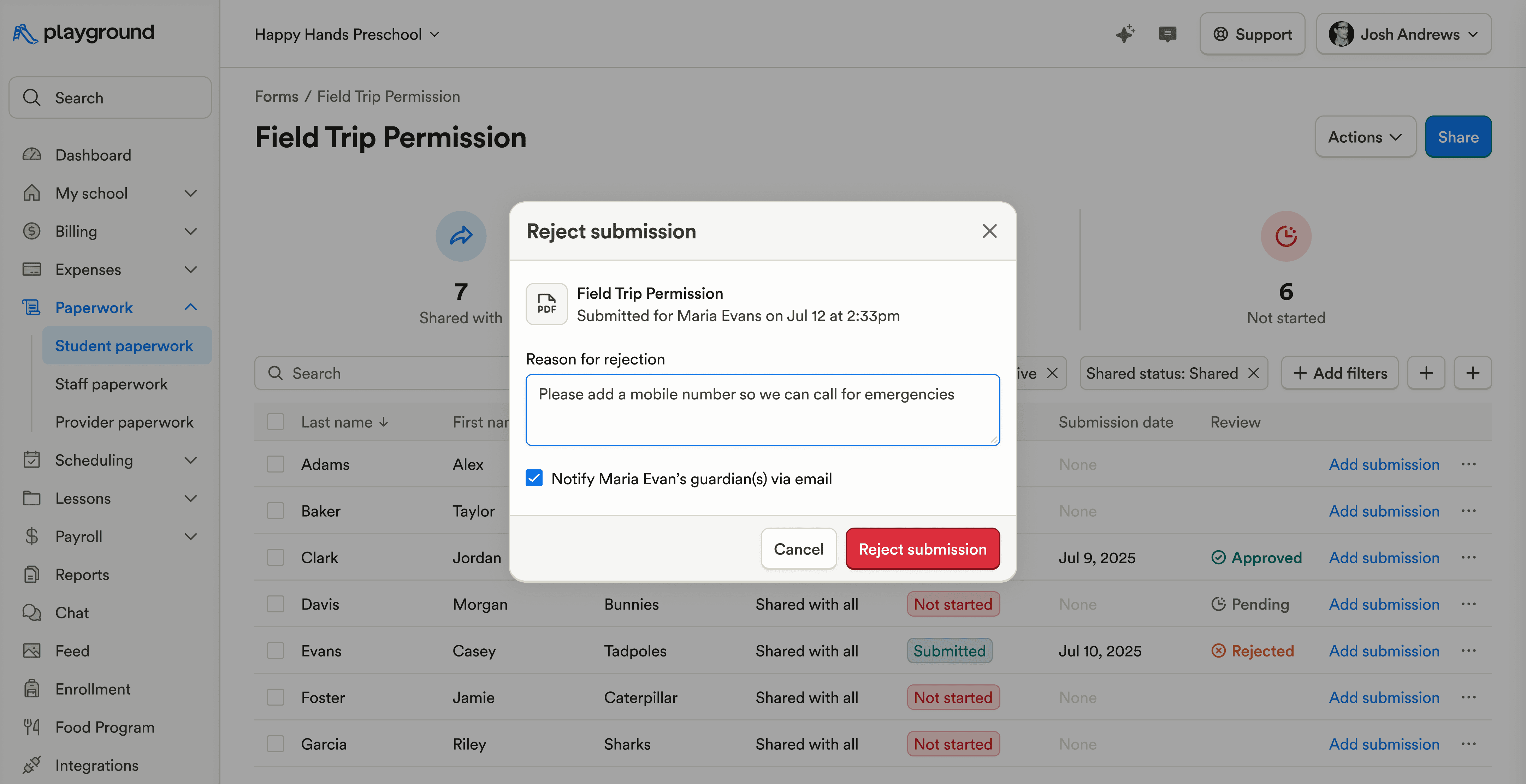
Paperwork submissions can now be approved or rejected, with an optional rejection email, making it easier to manage valid vs. invalid documentation with families.
The Paperwork tab on staff profiles is now a single combined table, making it easier to review a staff member’s documentation at a glance.
Guardians will always have access to their paperwork submissions, even if a form is no longer actively shared with the student, on both web and mobile.
Billing & Finances
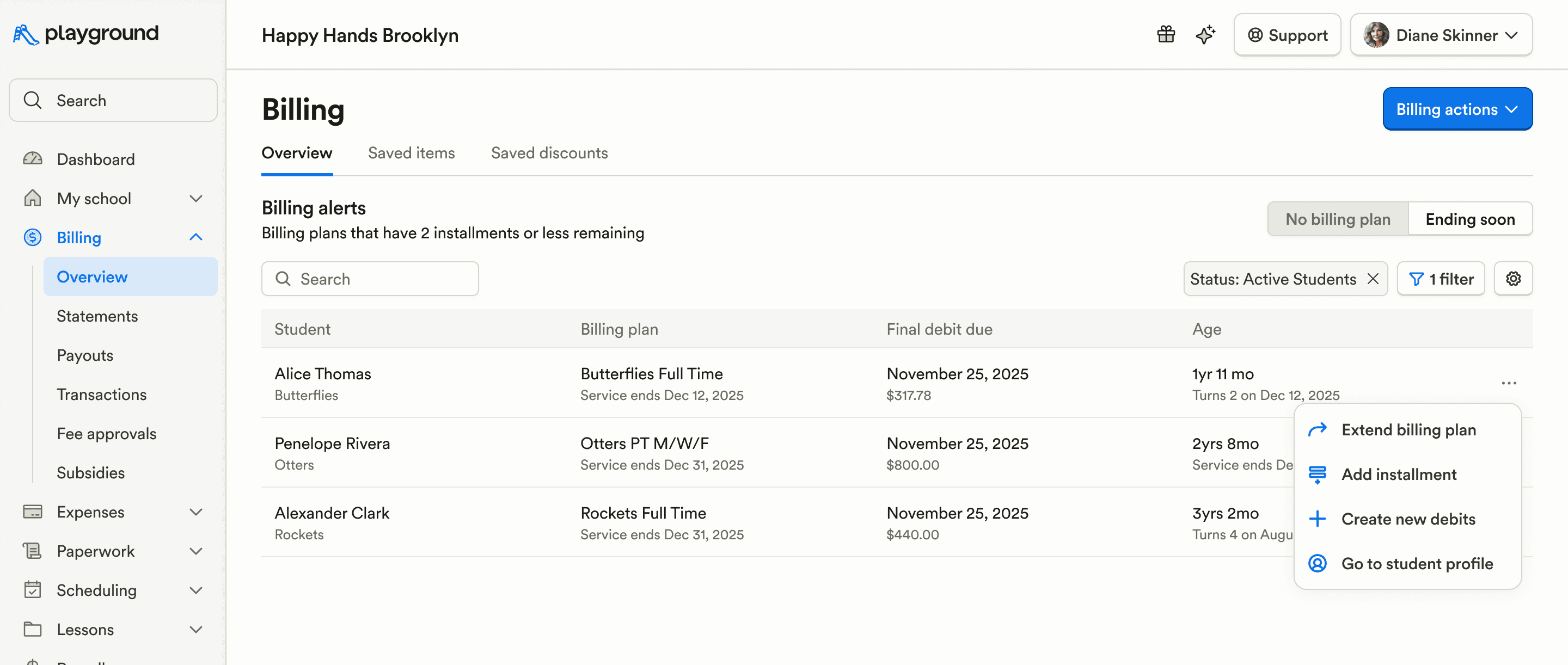
Added quick filters for “No billing plan” and “Ending soon” on the Billing page to help surface plans that need attention.
The payment disputes experience has been fully redesigned with clearer evidence upload and validation, making disputes faster and easier to resolve.
The payouts list and individual payout views have been redesigned to be clearer and more consistent with the rest of the platform.
Subsidy lists can now be sorted by student last name on the payment recording page, making reconciliation easier.
Future debits can now be updated by matching the current item price or applying a relative increase across all debits, simplifying bulk pricing changes.
An Active Students filter has been added to the billing plans page to reduce noise when managing plans.
Added FT/PT attendance counts and rate amounts to subsidy deposit tables for clearer subsidy payment review.
Payroll & HR
Added a “2% shareholder” earning type with predefined earnings for benefits and HSA, supporting compliant payroll setup for applicable employees.
Attendance & Ratios
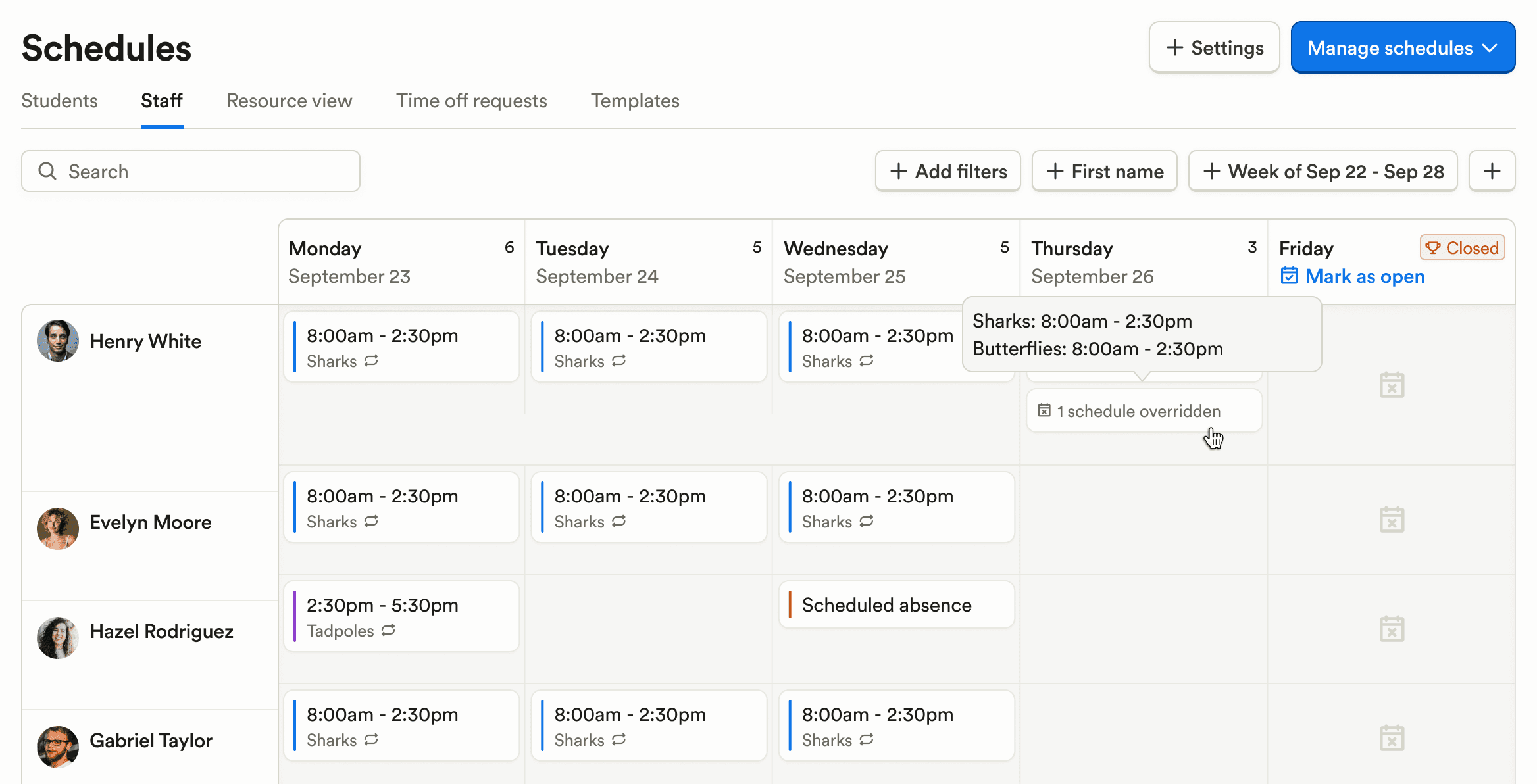
When a single-day schedule overrides a recurring schedule, the calendar now visually indicates the override to prevent scheduling confusion.
The My Food Program attendance export now supports two in/out logs per student, aligning with real-world attendance patterns.
The Attendance – Blank AM/PM report can now be grouped by Programs for easier review.
Food Program (CACFP)
Kindertrack submission tables now support search and status filtering, making it easier to manage and review submissions.
Family Communication
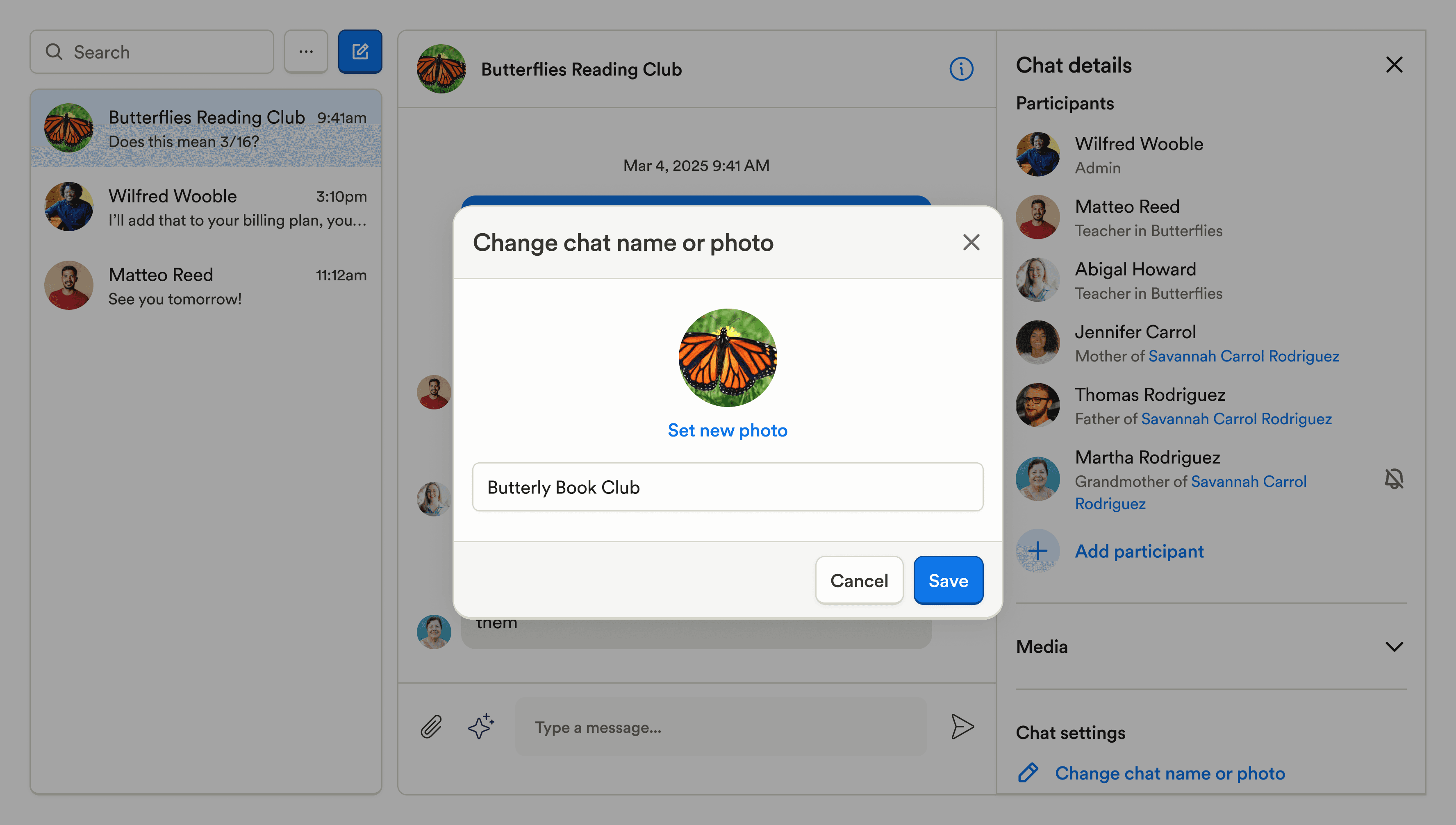
Group chat photos can now be updated, making it easier to distinguish conversations.
The Changes tab in classrooms now includes sub-tabs to filter by relevant actions, improving readability for staff reviewing updates.
Reporting & Insights
Fixed an issue where the “Nickname” field was not available in custom reports, restoring access to expected student data.
Platform, Integrations & Admin
Weekends have been removed from the enrollment forecast date picker to better reflect typical enrollment timelines.
Fixed an issue where birthdays in the upcoming calendar year were not shown when viewing the calendar near year-end.
Marketing & CRM
CRM tasks now include predefined due date options (e.g. Today, Tomorrow, In X business days), speeding up task creation.
CRM tasks can now be marked complete directly from the tasks table and lead detail pages, reducing extra clicks.
Enrollment & Paperwork
Paperwork submissions can now be approved or rejected, with an optional rejection email, making it easier to manage valid vs. invalid documentation with families.
The Paperwork tab on staff profiles is now a single combined table, making it easier to review a staff member’s documentation at a glance.
Guardians will always have access to their paperwork submissions, even if a form is no longer actively shared with the student, on both web and mobile.
Billing & Finances
Added quick filters for “No billing plan” and “Ending soon” on the Billing page to help surface plans that need attention.
The payment disputes experience has been fully redesigned with clearer evidence upload and validation, making disputes faster and easier to resolve.
The payouts list and individual payout views have been redesigned to be clearer and more consistent with the rest of the platform.
Subsidy lists can now be sorted by student last name on the payment recording page, making reconciliation easier.
Future debits can now be updated by matching the current item price or applying a relative increase across all debits, simplifying bulk pricing changes.
An Active Students filter has been added to the billing plans page to reduce noise when managing plans.
Added FT/PT attendance counts and rate amounts to subsidy deposit tables for clearer subsidy payment review.
Payroll & HR
Added a “2% shareholder” earning type with predefined earnings for benefits and HSA, supporting compliant payroll setup for applicable employees.
Attendance & Ratios
When a single-day schedule overrides a recurring schedule, the calendar now visually indicates the override to prevent scheduling confusion.
The My Food Program attendance export now supports two in/out logs per student, aligning with real-world attendance patterns.
The Attendance – Blank AM/PM report can now be grouped by Programs for easier review.
Food Program (CACFP)
Kindertrack submission tables now support search and status filtering, making it easier to manage and review submissions.
Family Communication
Group chat photos can now be updated, making it easier to distinguish conversations.
The Changes tab in classrooms now includes sub-tabs to filter by relevant actions, improving readability for staff reviewing updates.
Reporting & Insights
Fixed an issue where the “Nickname” field was not available in custom reports, restoring access to expected student data.
Platform, Integrations & Admin
Weekends have been removed from the enrollment forecast date picker to better reflect typical enrollment timelines.
Fixed an issue where birthdays in the upcoming calendar year were not shown when viewing the calendar near year-end.
Previous releases

CRM Inbox, API for Forms, Lesson Planning on Mobile
Enterprise Custom Reports & Bulk SMS Sending For Leads

Scheduled Reports, Duplicate Management, & Better Lesson Activities
Enterprise Custom Reports & Bulk SMS Sending For Leads

Show Staff Development Days & Edit Lesson Activities From Mobile
Enterprise Custom Reports & Bulk SMS Sending For Leads

Book a demo and simplify every corner of your business.




Book a demo and simplify every corner of your business.
