Table of Contents
Changelog
Enterprise Chat & Locking Staff Hour Records
Enterprise Chat & Locking Staff Hour Records
Published
Mobile Version
611
In This Update
1 Releases
12 Improvements
6 Fixes
Mobile Version
611
1 Releases
12 Improvements
6 Fixes
Marketing & CRM
CRM lead activity for enrollment applications now links directly to the student’s application, reducing extra navigation.
Tour confirmation emails now provide the correct connected sender options, making it easier to send from the appropriate address.
CRM email and SMS templates that are currently in use are now protected from deletion, with clearer guidance when a template is referenced by meetings or automations.
Personalized fields in CRM plain-text emails can now be deleted correctly using Backspace or Delete.
Billing & Finances
Split-family autopay settings now show and manage payment methods separately for each guardian group.
Payroll & HR
Locking time cards is now available in General Teacher Settings, allowing programs without payroll to lock historical staff attendance edits.
Manually added staff with multi-word names now save with the correct first and last name.
Enrollment & Paperwork
Enterprise paperwork can now be shared directly from paperwork tables, including bulk sharing to all active programs or selected programs.
Enterprise paperwork now supports program-specific submission notification recipients while still allowing enterprise-wide defaults.
Enterprise paperwork lists now include visibility filters so teams can focus on visible forms and documents by default.
Paperwork reminders no longer fail when older paperwork items are missing program assignments.
The document review flow no longer briefly displays “no file specified” after creating a fillable PDF.
Drag-and-drop uploads now work in document upload windows, including support for multiple files where applicable.
Food Program (CACFP)
California programs now have a CCTR enrollment and attendance report that exports the information required for subsidized enrollment and attendance reporting.
My Food Program exports now provide clearer explanations when meal or attendance submissions are rejected.
My Food Program now highlights potential student mapping mismatches so staff can review and resolve outdated mappings intentionally.
Family Communication
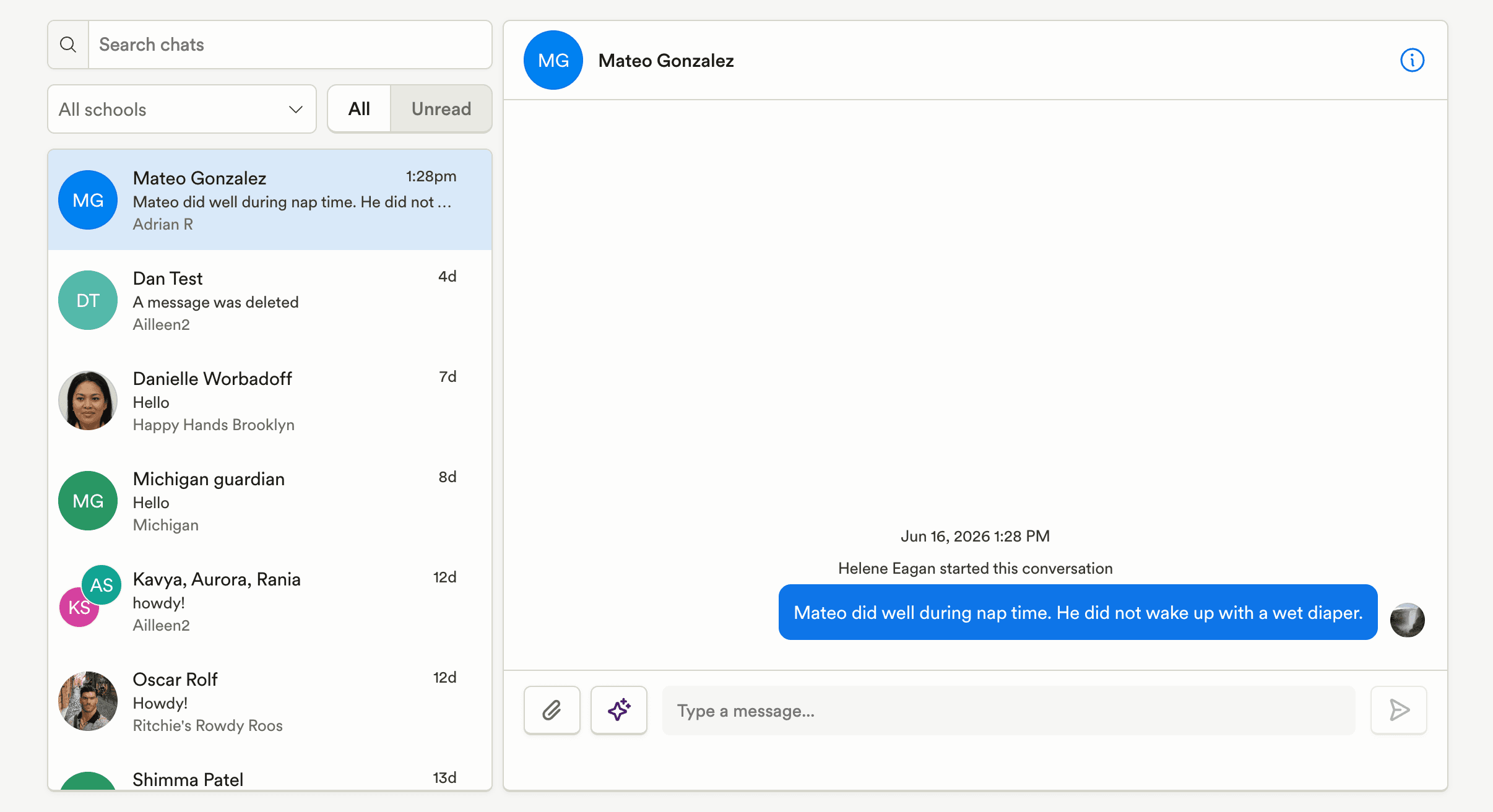
Enterprise admins now have a unified chat inbox on web, allowing them to view and respond to conversations across all programs from one place, with filters for program and unread messages.
Post recipient counts now include staff recipients for more accurate audience reporting.
Platform, Integrations & Admin
Enterprise connected program filters for search, status, and tags now persist when leaving and returning to the page.
Marketing & CRM
CRM lead activity for enrollment applications now links directly to the student’s application, reducing extra navigation.
Tour confirmation emails now provide the correct connected sender options, making it easier to send from the appropriate address.
CRM email and SMS templates that are currently in use are now protected from deletion, with clearer guidance when a template is referenced by meetings or automations.
Personalized fields in CRM plain-text emails can now be deleted correctly using Backspace or Delete.
Billing & Finances
Split-family autopay settings now show and manage payment methods separately for each guardian group.
Payroll & HR
Locking time cards is now available in General Teacher Settings, allowing programs without payroll to lock historical staff attendance edits.
Manually added staff with multi-word names now save with the correct first and last name.
Enrollment & Paperwork
Enterprise paperwork can now be shared directly from paperwork tables, including bulk sharing to all active programs or selected programs.
Enterprise paperwork now supports program-specific submission notification recipients while still allowing enterprise-wide defaults.
Enterprise paperwork lists now include visibility filters so teams can focus on visible forms and documents by default.
Paperwork reminders no longer fail when older paperwork items are missing program assignments.
The document review flow no longer briefly displays “no file specified” after creating a fillable PDF.
Drag-and-drop uploads now work in document upload windows, including support for multiple files where applicable.
Food Program (CACFP)
California programs now have a CCTR enrollment and attendance report that exports the information required for subsidized enrollment and attendance reporting.
My Food Program exports now provide clearer explanations when meal or attendance submissions are rejected.
My Food Program now highlights potential student mapping mismatches so staff can review and resolve outdated mappings intentionally.
Family Communication
Enterprise admins now have a unified chat inbox on web, allowing them to view and respond to conversations across all programs from one place, with filters for program and unread messages.
Post recipient counts now include staff recipients for more accurate audience reporting.
Platform, Integrations & Admin
Enterprise connected program filters for search, status, and tags now persist when leaving and returning to the page.
Previous releases

Meetings Reporting, Camber Voice Caller Recognition, & More API Data
Enterprise Custom Reports & Bulk SMS Sending For Leads

Auto-Detect Fillable PDF Fields, Redesigned Assessments, & Website Chat in CRM Inbox
Enterprise Custom Reports & Bulk SMS Sending For Leads

Enterprise Lesson Plans, Book Meetings Through API, Communication History
Enterprise Custom Reports & Bulk SMS Sending For Leads

Book a demo and simplify every corner of your business.



Book a demo and simplify every corner of your business.