

Table of Contents
Changelog
Auto-Detect Fillable PDF Fields, Redesigned Assessments, & Website Chat in CRM Inbox
Auto-Detect Fillable PDF Fields, Redesigned Assessments, & Website Chat in CRM Inbox
Published
Mobile Version
629
In This Update
2 Releases
13 Improvements
5 Fixes
Mobile Version
629
2 Releases
13 Improvements
5 Fixes
Marketing & CRM

Website chat conversations now appear in the CRM Inbox with their own Chat tab when visitors share contact information, so teams can follow up from the same inbox they use for calls, texts, and emails.
CRM booking tables now show a direct Record outcome action for past bookings without an outcome, reducing extra clicks for staff.
Meeting availability settings have been redesigned with clearer connected-calendar cards, searchable calendar selection, and separate meeting and conflict toggles.
CRM phone settings now support a single caller ID setting across all phone numbers, so enterprises no longer need to configure each number individually.
The mobile app now asks for a call outcome right after a call ends, matching the browser dialer and keeping CRM call records complete. This is coming in the next mobile release.
CRM template editors now keep unsaved edits when another template in the same configuration is saved, so in-progress email or SMS work is no longer overwritten.
Staff views of CRM emails no longer count as recipient opens, so open metrics better reflect real recipient activity.
CRM reporting charts now include No data buckets, keep x-axis labels visible on larger bar charts, and place custom properties under the correct Lead, Guardian, or Student heading.
Billing & Finances
Student billing on mobile has been redesigned, with split-family billing summaries coming next release.
Voucher copays can now use the new billing experience, aligning copay service dates with voucher periods and warning when a copay falls outside the voucher window.
Subsidy workflows now make it easier to choose the right child, correct agency student IDs, upload New Mexico remittance advice PDFs, and edit unassigned subsidy rates before vouchers use them.
Billing setup now includes autopay summary email recipients, so new schools can configure those notifications during onboarding.
Split-family overdue balances now respect guardian groups, so a credit in one group no longer hides another group’s overdue balance or reminder eligibility.
Payroll & HR
Admins can now include an optional reason when denying a staff time off request, and the reason is included in the staff notification.
Pay schedules now have a calendar view showing pay periods, approval dates, paydays, and bank holidays, with printing support.
The Staff Information report now shows Start date for staff without a linked payroll employee record, matching Staff Settings and PTO.
Enrollment & Paperwork
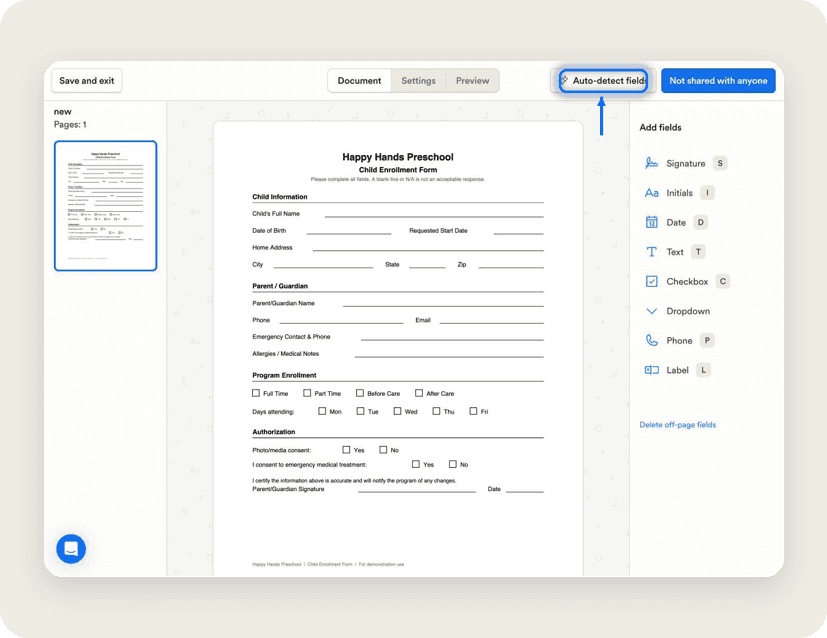
Fillable PDF review can now auto-detect fields and suggest blanks, signatures, and checkboxes for staff to review before saving, cutting down manual setup for paperwork.
Paperwork builders now show how many people a form or PDF is shared with, so admins can confirm recipients before opening the share settings.
Scheduling & Attendance
Guardians can now add only a missed check-out when a child already has an open check-in, avoiding duplicate attendance records. This is coming in the next mobile release.
Learning & Assessment
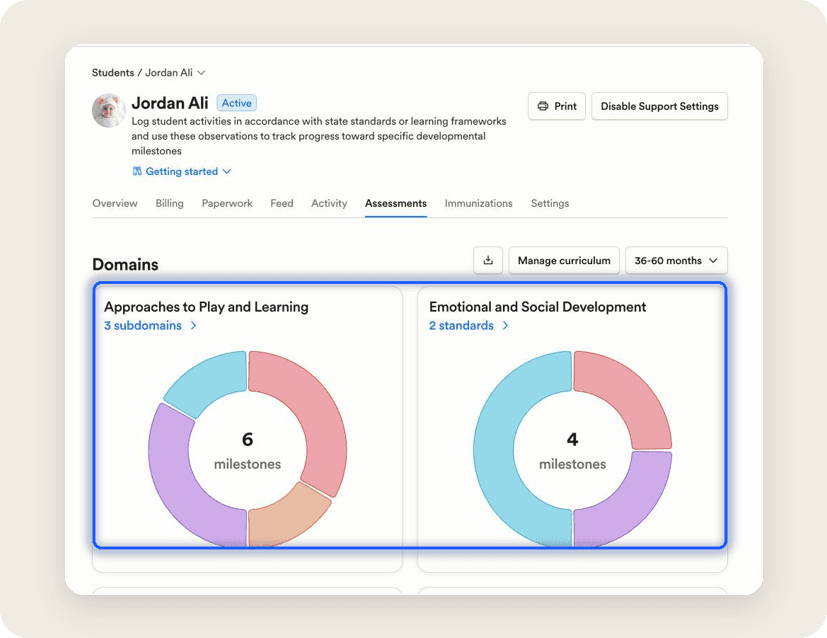
Student profiles now have a redesigned Assessments tab with chart-based milestone views, filters, timelines, and observation history, making it easier to review student progress.
Marketing & CRM
Website chat conversations now appear in the CRM Inbox with their own Chat tab when visitors share contact information, so teams can follow up from the same inbox they use for calls, texts, and emails.
CRM booking tables now show a direct Record outcome action for past bookings without an outcome, reducing extra clicks for staff.
Meeting availability settings have been redesigned with clearer connected-calendar cards, searchable calendar selection, and separate meeting and conflict toggles.
CRM phone settings now support a single caller ID setting across all phone numbers, so enterprises no longer need to configure each number individually.
The mobile app now asks for a call outcome right after a call ends, matching the browser dialer and keeping CRM call records complete. This is coming in the next mobile release.
CRM template editors now keep unsaved edits when another template in the same configuration is saved, so in-progress email or SMS work is no longer overwritten.
Staff views of CRM emails no longer count as recipient opens, so open metrics better reflect real recipient activity.
CRM reporting charts now include No data buckets, keep x-axis labels visible on larger bar charts, and place custom properties under the correct Lead, Guardian, or Student heading.
Billing & Finances
Student billing on mobile has been redesigned, with split-family billing summaries coming next release.
Voucher copays can now use the new billing experience, aligning copay service dates with voucher periods and warning when a copay falls outside the voucher window.
Subsidy workflows now make it easier to choose the right child, correct agency student IDs, upload New Mexico remittance advice PDFs, and edit unassigned subsidy rates before vouchers use them.
Billing setup now includes autopay summary email recipients, so new schools can configure those notifications during onboarding.
Split-family overdue balances now respect guardian groups, so a credit in one group no longer hides another group’s overdue balance or reminder eligibility.
Payroll & HR
Admins can now include an optional reason when denying a staff time off request, and the reason is included in the staff notification.
Pay schedules now have a calendar view showing pay periods, approval dates, paydays, and bank holidays, with printing support.
The Staff Information report now shows Start date for staff without a linked payroll employee record, matching Staff Settings and PTO.
Enrollment & Paperwork
Fillable PDF review can now auto-detect fields and suggest blanks, signatures, and checkboxes for staff to review before saving, cutting down manual setup for paperwork.
Paperwork builders now show how many people a form or PDF is shared with, so admins can confirm recipients before opening the share settings.
Scheduling & Attendance
Guardians can now add only a missed check-out when a child already has an open check-in, avoiding duplicate attendance records. This is coming in the next mobile release.
Learning & Assessment
Student profiles now have a redesigned Assessments tab with chart-based milestone views, filters, timelines, and observation history, making it easier to review student progress.
Previous releases

Enterprise Lesson Plans, Book Meetings Through API, Communication History
Enterprise Custom Reports & Bulk SMS Sending For Leads

Call Support for API, Coming Due Paperwork Report, & Bulk Photo Downloads
Enterprise Custom Reports & Bulk SMS Sending For Leads

Multiple Overage Fees & Ability to Disable Enterprise Accounts
Enterprise Custom Reports & Bulk SMS Sending For Leads

Book a demo and simplify every corner of your business.




Book a demo and simplify every corner of your business.
